
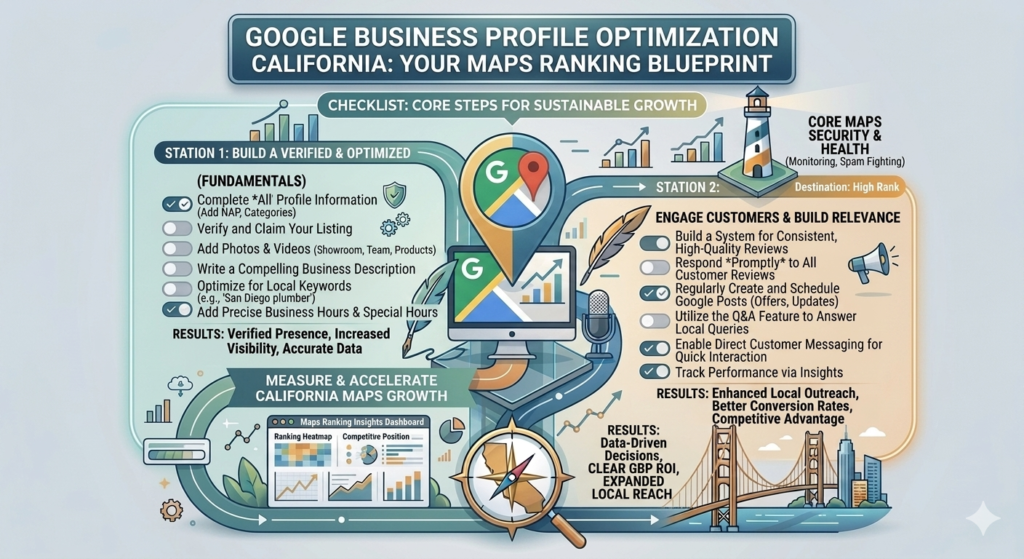
Google Business Profile Optimization California: A Complete Guide to Ranking Higher in Local Search
If you’re looking to improve your Google Business Profile optimization California, you’re already taking one of the most important steps toward increasing your local online visibility. When potential customers search for products or services in their area, Google often displays a map with local business listings before the traditional organic search results. Businesses with well-optimized profiles have a much better chance of appearing in these highly visible positions.
A Google Business Profile (formerly Google My Business) is more than just an online directory listing. It’s a powerful marketing tool that helps customers discover your business, learn about your services, read customer reviews, view photos, and contact you directly. Whether you own a local service business, restaurant, retail store, healthcare practice, or digital marketing agency, optimizing your profile can significantly increase website visits, phone calls, and qualified leads.
At Webex Marketing Technology, we help businesses strengthen their online presence through Local SEO, website optimization, and Google Business Profile management. A properly optimized profile works alongside your website to improve visibility in Google Search and Google Maps.
What Is Google Business Profile?
Google Business Profile is a free platform provided by Google that allows businesses to manage how they appear in Google Search and Google Maps.
Your profile can display important business information, including:
- Business name
- Address
- Phone number
- Website
- Business hours
- Customer reviews
- Business description
- Products and services
- Photos and videos
- Questions and answers
When customers search for businesses near them, Google uses this information to determine which companies are most relevant to display in local search results.
To learn more about Google’s official guidelines, you can visit the Google Business Profile Help Center.
Why Google Business Profile Is Important for California Businesses
California is home to one of the largest and most competitive business markets in the United States. Whether your business serves Los Angeles, San Diego, Irvine, Orange County, San Jose, or Sacramento, customers frequently use Google to find nearby businesses before making purchasing decisions.
An optimized Google Business Profile helps your business:
- Appear in Google Maps
- Increase local search visibility
- Generate more phone calls
- Drive website traffic
- Build customer trust
- Receive more direction requests
- Increase qualified leads
If you’re already investing in Local SEO Services California, your Google Business Profile should be a key part of your strategy because it directly influences local search performance.
Complete Every Section of Your Business Profile
One of the easiest ways to improve your Google Business Profile is by completing every available section.
Include accurate information such as:
- Business name
- Business category
- Address
- Phone number
- Website URL
- Business hours
- Services
- Products
- Service areas
- Business description
Google prefers complete and accurate listings because they provide better experiences for users.
Before publishing your profile, verify that your website information matches your business listing. Consistency helps Google understand your business and improves local trust signals.
Choose the Correct Business Categories
Selecting the correct business category is one of the most important optimization steps.
Your primary category should accurately describe your main service.
Additional categories can highlight other services your business provides.
For example, a digital marketing agency might select categories related to:
- Internet Marketing Service
- Marketing Agency
- Website Designer
- Advertising Agency
- SEO Consultant
Choosing relevant categories increases the likelihood of appearing in searches that match your services.
Write a Keyword-Optimized Business Description
Your business description gives customers and Google a better understanding of your company.
A strong description should naturally include:
- Your primary services
- Service areas
- Industry experience
- Unique selling points
- Customer-focused messaging
Instead of stuffing keywords, write naturally while mentioning important services like SEO, website development, Local SEO, lead generation, and content marketing.
For businesses looking to improve their overall search rankings, our guide on SEO Services California explains how optimized content supports long-term visibility.
Upload High-Quality Business Photos
Businesses with professional photos generally receive more engagement than listings with few or no images.
Consider adding:
- Office photos
- Team photos
- Completed projects
- Products
- Services
- Company vehicles
- Customer interactions
Keep your images updated regularly to show customers that your business is active.
Your website should also showcase professional visuals. If you’re considering updating your website, our article on Website Redesign California explains how modern design improves customer confidence and conversions.
Customer Reviews Build Trust and Improve Rankings
Online reviews influence both customer decisions and local search performance.
Encourage satisfied customers to leave honest reviews after completing a project or providing a service.
When responding to reviews:
- Thank customers for their feedback
- Address concerns professionally
- Respond promptly
- Maintain a friendly tone
Businesses with consistent, positive reviews often attract more inquiries than competitors with inactive profiles.
Google recommends responding to reviews because it demonstrates that you value customer feedback.
You can learn more by visiting the official Google Business Profile website.
Keep Your Business Information Updated
Your business information should always remain accurate.
Review your profile whenever you change:
- Business hours
- Phone number
- Website
- Address
- Services
- Holiday schedules
Keeping your profile updated improves customer experience and helps Google display accurate information.
Your website should also remain updated. Our guide on Website Maintenance California explains why regular maintenance supports SEO, security, and website performance.
Publish Regular Google Posts
Google Business Profile allows businesses to publish updates that appear directly on their listing.
Examples include:
- Company news
- New blog posts
- Special promotions
- Product launches
- Events
- Seasonal offers
Publishing regular posts keeps your profile active and provides additional engagement opportunities for potential customers.
If you’re consistently creating valuable articles, our guide on Content Marketing California explains how blogging supports both SEO and customer engagement.
Monitor Google Business Profile Insights
Optimizing your profile is only the first step. To continue improving your local visibility, you should regularly review your Google Business Profile Insights. These analytics show how customers find and interact with your business listing.
Some of the most valuable metrics include:
- Search terms customers use
- Website clicks
- Phone calls
- Direction requests
- Photo views
- Profile views
- Customer actions
By analyzing this data, you can identify which services generate the most interest and adjust your marketing strategy accordingly.
To better understand website visitors after they click through from your profile, you can also use Google Analytics to monitor user behavior, traffic sources, and conversions.
Maintain NAP Consistency Across the Internet
One of the most important Local SEO ranking factors is NAP consistency.
NAP stands for:
- Name
- Address
- Phone Number
Your business information should be identical everywhere it appears online, including:
- Your website
- Google Business Profile
- Yelp
- Bing Places
- Local business directories
Even small differences, such as abbreviating “Street” on one listing but spelling it out on another, can create confusion for search engines.
Our article on Technical SEO Checklist for California Business Websites explains why consistency is important for search engines and overall website health.
Optimize Your Website Alongside Your Google Business Profile
Many business owners expect their Google Business Profile to generate results on its own.
In reality, Google also evaluates the quality of your website.
Your website should include:
- Fast loading pages
- Mobile-friendly design
- Optimized service pages
- Clear contact information
- Strong internal linking
- Helpful content
- Secure HTTPS connection
Google compares information on your website with your Google Business Profile to determine trust and relevance.
If your website is outdated, improving it can significantly strengthen your Local SEO efforts. Our guide on Professional Website for California Small Businesses explains the features every business website should include.
Publish Helpful Content Regularly
Google prefers businesses that remain active online.
One of the best ways to demonstrate expertise is by publishing informative content that answers customer questions.
Examples include:
- Industry news
- Service guides
- FAQs
- How-to articles
- Customer success stories
- Local business tips
Publishing valuable content also creates more opportunities to rank for relevant keywords.
If you’re developing a long-term SEO strategy, our guide on Content Marketing California explains how consistent publishing builds authority and improves organic traffic.
Encourage and Respond to Customer Reviews
Customer reviews are among the strongest trust signals for both users and search engines.
Instead of focusing only on collecting reviews, make it a priority to respond to every review professionally.
When replying:
- Thank customers for positive feedback.
- Address concerns respectfully.
- Avoid generic responses.
- Personalize your replies whenever possible.
Active engagement demonstrates that your business values customer relationships.
Google also recommends responding to reviews because it improves the customer experience.
Common Google Business Profile Mistakes
Many businesses unintentionally reduce their visibility by making avoidable mistakes.
Some of the most common include:
- Leaving business information incomplete
- Selecting the wrong business category
- Ignoring customer reviews
- Using low-quality photos
- Publishing inconsistent contact information
- Failing to update business hours
- Keyword stuffing the business name
- Neglecting regular profile updates
Avoiding these mistakes helps maintain a stronger presence in local search results.
Advanced Google Business Profile Optimization Tips
Once you’ve completed the basics, take your profile to the next level by implementing advanced optimization techniques.
These include:
Add Products and Services
Describe your services in detail and include relevant keywords naturally.
Upload Videos
Short videos showcasing your office, staff, or completed projects increase customer engagement.
Use Questions & Answers
Add frequently asked questions that address common customer concerns before they contact you.
Keep Photos Updated
Businesses that regularly upload fresh photos often receive higher engagement than inactive listings.
Build Local Authority
Strengthen your Google Business Profile by earning backlinks from reputable local organizations, business associations, and community websites.
Our article on Website Lead Generation California explains how improving trust signals can also increase website conversions.
How Google Business Profile Supports Lead Generation
Many customers never visit multiple websites before making a decision.
Instead, they:
- Search Google
- Read reviews
- View photos
- Compare ratings
- Click “Call”
- Request directions
A fully optimized Google Business Profile can become one of your strongest lead-generation tools.
Combined with an optimized website and strong SEO, it creates a complete digital marketing strategy.
Why Choose Webex Marketing Technology?
At Webex Marketing Technology, we help businesses across California improve their online visibility through strategic Local SEO and Google Business Profile optimization.
Our services include:
- Google Business Profile Setup
- Google Business Profile Optimization
- Local SEO
- Website Development
- WordPress Development
- Shopify Development
- Technical SEO
- Content Marketing
- Website Maintenance
- Lead Generation
Unlike agencies that simply create a profile and leave it untouched, we continuously optimize your listing to improve rankings, engagement, and customer inquiries.
If you’d like to see examples of our work, visit our Portfolio to explore recent website development and digital marketing projects.
Frequently Asked Questions
What is Google Business Profile optimization?
Google Business Profile optimization is the process of improving your business listing so it ranks higher in Google Search and Google Maps while attracting more customers.
How long does it take to see results?
Many businesses begin noticing improvements within a few weeks, while more competitive markets may require several months of consistent optimization and review management.
Does Google Business Profile help SEO?
Yes. An optimized profile supports Local SEO by improving your visibility in Google Maps, increasing customer engagement, and sending positive trust signals to Google.
Can I manage my Google Business Profile myself?
Yes. However, working with professionals helps ensure your profile follows best practices, remains updated, and supports your overall digital marketing strategy.
Why are customer reviews important?
Positive reviews build trust, improve click-through rates, and contribute to stronger local search visibility.
Final Thoughts
Investing in Google Business Profile optimization California is one of the most effective ways to increase local visibility, build customer trust, and generate qualified leads. A well-managed profile helps your business appear where customers are already searching—on Google Search and Google Maps.
When combined with a professional website, Local SEO, technical optimization, and consistent content marketing, your Google Business Profile becomes a powerful marketing asset that supports long-term business growth.
If you’re ready to improve your local search presence, Webex Marketing Technology can help you optimize your Google Business Profile, strengthen your Local SEO strategy, and attract more customers across California.
Want to rank higher in Google Maps and attract more local customers?
Webex Marketing Technology offers professional Google Business Profile Optimization, Local SEO services designed to help California businesses grow.
Contact us today on WhatsApp for a free consultation and discover how we can improve your online visibility and generate more qualified leads.
Call to Action
Want to rank higher in Google Maps and attract more local customers?
Webex Marketing Technology offers professional Google Business Profile Optimization, Local SEO, and Website SEO services designed to help California businesses grow.
Contact us today on WhatsApp for a free consultation and discover how we can improve your online visibility and generate more qualified leads.